

|
|


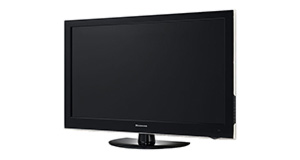
Logik L22FED13 overview
Number of problems: 44
Number of solved problems: 14
Number of unsolved problems: 30
Problem resolution: 32%
Compared to other tvs:
Logik L22FED13: Likelihood of getting a solution
Ranking: 36th out of 381
Most likely to get a solution:
Samsung PS51F8500 - problem resolution score of 100%
Samsung PS51F8500 - problem resolution score of 100%
Least likely to get a solution:
Toshiba 32BV701B - 5 out of 14 problems solved
Toshiba 32BV701B - 5 out of 14 problems solved
Solved problem list for the Logik L22FED13
(Click on a problem to see the solution)New tv and can't work out how to get sky through it. worked great with old one but someone else tuned it not me!
Finish watching the tv at night and turn off leaving in stand-by mode. When it is next switched on, it's changed to dvd player. This isn't too much of a problem for me, but the tv is my elderly mum's and she has only mastered changing channels and volume! I can immediately get the tv to resume by pressing the 'input' button and selecting DTV, so there's no viewing problem, it's just that it seems to switch to dvd mode when the tv is turned back on. I've reset to factory settings, but still not solved.
Any suggestions?
Andy
Good day with hope you are OK, please I have a logik tv L22LDVB21 and if I am playing Dvd movies on it the sound stops and starts, why, is it that it is faulty? If there is any thing I need to do please let me know because I really love the TV. Expecting your reply thanks
Why has my logic tv stopped playing dvd's through my separate dvd player
BBC programs keep turning off, freezing why????? Only the BBC 1,BBC 23
All other channels are fine
dVd won't eject or read!
Nothing in instructions to help
One year old TV seizes up in standby mode with red light showing. Does not react to remote or on/off switch, the display light remains red.
Unplug and plug back in resurrects the TV but it takes more and more attempts to do it. Plugging back in the display light goes blue but the TV is dead, eventually, after several attempts, it will briefly go blue then red and the TV will work.
TV on record won't let me watch another channel
Unable to open timer-recorded TV programs from USB memory stick. Shows a message "Unsupported File." This has just started. There are older such recordings which open fine.
No such problems with "instant" (not timer-recorded) programs. They still playback without any problem
I have a Logik 46HD Model 46fe22 and have contacted Logik with the following question with no answer.
I am hard of hearing so use and induction loop connected to the television which appears to take up the only connection point.
I would like to connect a DVD player and a VHS player to this television but can't work out how to do so.
There are a number of plug points marked as follows:
HDM11
USB
PC AUDIO
PC IN
Y PD
PR
HDM12
Thanking you in anticipation.
Unsolved problem list for the Logik L22FED13
(Click on a problem to comment or help)When the TV is switched on the default input setting is DVD even though it has never been used. We therefore have to change the input to DTV or Scart manually every time we switch it on which is a pain.
recently watched a childrens DVD with no problem, but the next day when we turned the tv on, the dvd channel automatically appears on screen stating 'no signal', although it is possible to return to tv channels by selecting DTV on the input menu, every time the tv is turned on it automatically starts with dvd channel 'no signal' and none of the dvd functions are responding! the dvd is also now stuck in the machine and will not eject! I have tried re-tuning the tv on a first time installation basis to start from scratch but did not work, any advise gratefully recieved thankyou. Jackie
TV is on but no picture black screen. Blue light is on
Hello I bought a second hand TV today..
When I switch to Dtv the pictures don't show but the sound come out.
Pls help me
Bought a 20 inch today, went to set up, it scanned then nothing! Notice in top left hand corner, no chann LS. It's not the Aries, as I connected to my other tv and same response. What's gone wrong with set up, and how do I go back to maybe start again. So annoying.
We thought our handset batteries had run out as we plug TV in wall and when we used the remote we could not get it on, we usually have a red light then once you use handset tis go green and you choose channel.
New batteries in handset but still can not get TV on there appears to be no light appearing we have to use the side channel buttons
any ideas ???
Logic L22FED13 tv dvd combo plays DVDs but a rattling / humming noise occurs only when watching DVDs. Can anyone advise if and how I can repair it please? Any help great fully received
When playing a DVD the picture suddenly cuts off. then restarts at a later time, or sometimes stops altogether.
How do i unlock my logik tv
How do I turn off audio commentry
Solutions for the Logik L22FED13
1 person also had this problem.
Problem: New tv and can't work out how to get sky through it. worked great with old one but someone else tuned it not me!
There are 0 comments on this problem.
Solution 1: Connect your Sky box to the TV using an HDMI cable (or a SCART cable if the Sky box is quite old). No tuning is necessary! Just turn on the Sky box and make sure the input on the TV is set to correspond with the connected HDMI input 1 or 2 (or AV if using an old box). If the TV is turned on first, followed by the Sky box, then it should automatically pick up the signal and switch to the correct input. You may need to go into the settings on the Sky box and change the SCART Control to 'ON' on a SCART connected box but HDMI should be able to switch automatically. Hope this helps, good luck!
0 out of 1 person found this solution helpful.
Was this solution helpful?
There are 0 comments on this solution.

7 people also had this problem.
Problem: Finish watching the tv at night and turn off leaving in stand-by mode. When it is next switched on, it's changed to dvd player. This isn't too much of a problem for me, but the tv is my elderly mum's and she has only mastered changing channels and volume! I can immediately get the tv to resume by pressing the 'input' button and selecting DTV, so there's no viewing problem, it's just that it seems to switch to dvd mode when the tv is turned back on. I've reset to factory settings, but still not solved.
Any suggestions?
Andy
There is 1 comment on this problem.
Show/Hide
- On start up the set defaults to any input that has an input signal eg Scart, PC etc, before starting up DTV. Only solution is to switch off all connected devices
Helpful: 0/0 Do you think this comment was helpful?
Solution 1: If it powers up on the DVD input without a disc being in the drive then it sounds like a fault. Speak to the 'Knowhow' people at DOG on 0844 561 1234. Good luck!
1 out of 2 people found this solution helpful.
Was this solution helpful?
There are 0 comments on this solution.
0 people also had this problem.
Problem: Good day with hope you are OK, please I have a logik tv L22LDVB21 and if I am playing Dvd movies on it the sound stops and starts, why, is it that it is faulty? If there is any thing I need to do please let me know because I really love the TV. Expecting your reply thanks
There are 0 comments on this problem.
Solution 1: If the sound is only intermittent when using DVDs then make sure that it's not the discs you are playing by trying them in another DVD player or a computer DVD drive. If the sound is fine on another device then you may have a fault on your Logix TV / DVD combo. If the discs are at fault (sound is intermittent on another device) then you could try cleaning the discs with a lint-free cloth dampened with slightly soapy water. Make sure they are completely dry before reinsertion. If this doesn't help you could try a disc scratch repair tool like a Skip Dr. Otherwise if the combo player is the cause, it may just be caused by a dirty lens. Try a CD / DVD lens cleaning disc to try to remedy the problem, or else speak to the retailer for advice on repairs. Good luck!
0 out of 0 people found this solution helpful.
Was this solution helpful?
There are 0 comments on this solution.
0 people also had this problem.
Problem: Why has my logic tv stopped playing dvd's through my separate dvd player
There are 0 comments on this problem.
Solution 1: Check your HDMI cable from the separate DVD player is connected properly. Try connecting it to the other HDMI socket on the TV, if it works on the other HDMI socket then swap it back and try again. If it won't work from the first socket only then there's a probable fault with the TV. If it doesn't work with either HDMI socket then try using a different HDMI cable. If that works with both HDMI sockets then your original HDMI cable is probably faulty. However, if a different HDMI cable makes no difference it could be the TV or the DVD that's faulty. Try connecting the DVD player to a different TV and see what happens. If it doesn't work with either HDMI cable on a different TV then it is most likely the DVD player that's faulty. Good luck!
0 out of 0 people found this solution helpful.
Was this solution helpful?
There are 0 comments on this solution.


